A seguir, para que o compilador java do eclipse saiba que a biblioteca swt existe, é necessário incluí-la no build path. Para isto, vá em properties do seu projeto e clique na aba Libraries, e a seguir, no botão Add JARS... conforme as telas abaixo:
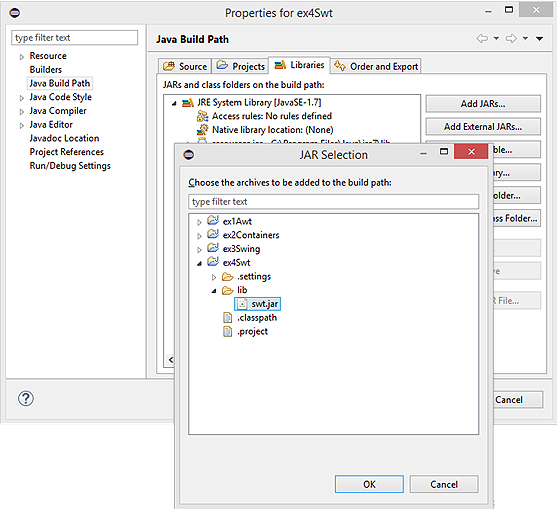
Feito isto, crie uma classe MyFirstSwtForm, e copie o código abaixo:
package modulo1;

import org.eclipse.swt.SWT;
import org.eclipse.swt.graphics.Point;
import org.eclipse.swt.graphics.Rectangle;
import org.eclipse.swt.layout.FormAttachment;
import org.eclipse.swt.layout.FormData;
import org.eclipse.swt.layout.FormLayout;
import org.eclipse.swt.widgets.Button;
import org.eclipse.swt.widgets.Display;
import org.eclipse.swt.widgets.Event;
import org.eclipse.swt.widgets.Label;
import org.eclipse.swt.widgets.Listener;
import org.eclipse.swt.widgets.Shell;

public class MyFirstSwtForm {

    /**
   * @param args
   */
    public static void main(String[] args) {
        Display display = new Display();
        final Shell shell = new Shell(display);

        Label label = new Label(shell, SWT.WRAP);
        label.setText("Alo! Mundo!");

        Button button1 = new Button(shell, SWT.PUSH);
        button1.setText("OK");
        Button button2 = new Button(shell, SWT.PUSH);
        button2.setText("Cancel");

        final int insetX = 4, insetY = 4;
        FormLayout formLayout = new FormLayout();
        formLayout.marginWidth = insetX;
        formLayout.marginHeight = insetY;
        shell.setLayout(formLayout);

        Point size = label.computeSize(SWT.DEFAULT, SWT.DEFAULT);
        final FormData labelData = new FormData(size.x, SWT.DEFAULT);
        labelData.left = new FormAttachment(0, 0);
        labelData.right = new FormAttachment(100, 0);
        label.setLayoutData(labelData);

        shell.addListener(SWT.Resize, new Listener() {
          public void handleEvent(Event e) {
            Rectangle rect = shell.getClientArea();
            labelData.width = rect.width - insetX * 1;
            shell.layout();
          }
        });

        FormData button2Data = new FormData();
        button2Data.top = new FormAttachment(label, insetY);
        button2Data.right = new FormAttachment(100, -insetX);
        button2Data.bottom = new FormAttachment(100, 0);
        button2.setLayoutData(button2Data);

        FormData button1Data = new FormData();
        button1Data.right = new FormAttachment(button2, -insetX);
        button1Data.bottom = new FormAttachment(100, 0);
        button1.setLayoutData(button1Data);

        shell.pack();
        shell.open();
        while (!shell.isDisposed()) {
          if (!display.readAndDispatch())
            display.sleep();
        }
        display.dispose();
    }
}
Copyright © 2014 AIEC.